Before you start
Lovely Craft is a voxel block builder for Android, and installing it takes about five minutes from start to first world. The file is a ~44 MB XAPK, which bundles the game APK with its data files. That single detail changes one step of the install, and this guide covers it.
You need two things ready: the Lovely Craft APK download page open in your browser, and a free XAPK installer app from the Play Store. The Lovely Craft APK lists the exact version and size so you can confirm the file you grab is complete.
Step 1: Download the XAPK
On the download page, wait out the short six-second countdown and tap the download button. The ~44 MB file lands in your Downloads folder. Do not rename it, and confirm the size matches before continuing: a smaller file means an interrupted download.
Step 2: Get an XAPK installer
Android's built-in installer cannot read XAPK packages. Install any well-reviewed XAPK installer from the Play Store; they are free and take seconds to set up. Our XAPK vs APK guide explains why the game ships in this format.
Step 3: Allow installs from unknown sources
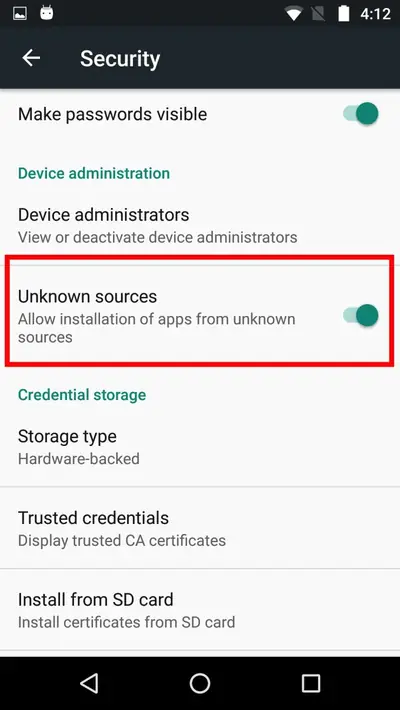
Open the downloaded XAPK through your installer app. Android will ask permission to install unknown apps: allow it for the installer. On newer Android this is a per-app toggle; on older versions it lives under Settings, then Security. You do this once and never again.
Step 4: Install and launch
Tap Install and wait for the unpack to finish, usually under a minute. Open this block builder from your app drawer, pick creative or survival mode, and your first world generates in seconds. No account, no login.
If something goes wrong
Two errors cover most failures. An App not installed message means a conflicting copy is already on the phone: uninstall it first. A parse error means the download was incomplete: re-download and check the size. The install fixes guide covers every error message in order.